
Why does data security matter for businesses?
Customer records, financial information, employee data, contracts, production plans, and trade secrets underpin daily business operations. When this information is lost, altered, or accessed without authorization, the impact extends beyond IT: business continuity, customer trust, and corporate reputation are all at risk.
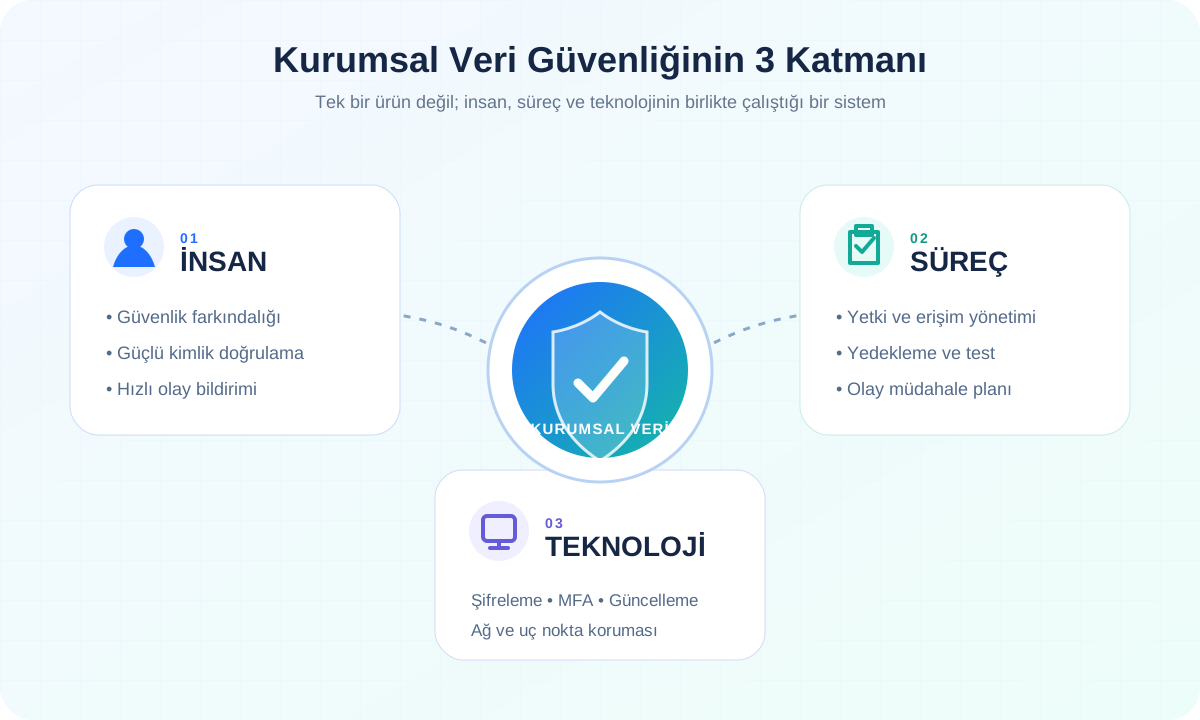
Business data security is the combination of people, processes, and technology used to preserve the confidentiality, integrity, and availability of information. An effective approach goes beyond installing antivirus software. Access rights, backup reliability, employee awareness, and incident response must be managed together.
The most common business data security risks
Data loss does not always begin with a sophisticated cyberattack. An email sent to the wrong recipient, a weak password, a lost device, excessive permissions, or an unusable backup can cause serious disruption. Risk reviews should therefore consider external threats alongside human and process errors.
- Phishing messages and compromised user accounts
- Weak, reused, or shared passwords
- Ransomware and malware infections
- Misconfigured cloud storage and sharing permissions
- Unauthorized employee or third-party access
- Unpatched software, servers, and network devices
- Data loss caused by device failure, human error, or disasters
- Incomplete or untested backup processes
1. Identify the data your business holds
A business cannot protect information it does not understand. Create a current data inventory showing what information is stored, where it is held, who uses it, and how it moves between systems.
Classify customer information, financial records, employee files, contracts, email, ERP, and CRM data by sensitivity and business importance. This makes access, retention, and backup decisions more accurate.
2. Apply the principle of least privilege
Every user should have access only to the systems and data required for their role. Permissions should be updated promptly when employees change roles, departments, or leave the company.
Separate administrator accounts from everyday user accounts, remove shared accounts, and review access regularly. Authorization is an ongoing management process, not a one-time onboarding task.
3. Enable multi-factor authentication
A password alone is not a sufficient security layer. Use multi-factor authentication for email, cloud services, VPN access, ERP systems, remote access tools, and administrative panels.
This makes account compromise more difficult even when a password is exposed. Prioritize administrator accounts and remotely accessible systems.
4. Validate backups with recovery tests
Creating backups is not enough; the business must regularly confirm that data can be restored. Keep multiple copies of critical information and store at least one copy separately from the primary environment.
Set backup frequency according to acceptable data loss and downtime. Record recovery test results and configure alerts for failed backup jobs.
5. Keep systems and software current
Outdated operating systems, web applications, plugins, servers, and network devices may contain known vulnerabilities. Track software versions and apply critical security updates through a planned process.
Remove or isolate unused applications, dormant accounts, and unsupported systems. Update management should have clear owners, schedules, and continuity safeguards.
6. Provide regular security awareness training
Employees are one of the most important defensive layers. Provide regular training on recognizing phishing, sharing files safely, using strong passwords, reporting suspicious activity, and working with personal devices.
Support training with short reminders, realistic scenarios, and controlled exercises. Build a culture in which employees report mistakes quickly instead of hiding them.
7. Encrypt data in transit and at rest
Protect sensitive data with appropriate encryption both when it moves between systems and when it is stored in databases, disks, or backup media. Full-disk encryption is particularly important for laptops and mobile devices.
Encryption key storage, access, and rotation are as important as the encryption itself. Poor key management can undermine otherwise strong protection.
8. Build layered network and device security
Treat firewalls, endpoint protection, email filtering, network segmentation, and secure remote access as complementary controls. Critical servers should not share the same security zone as guest networks or general user devices.
Manage corporate phones and laptops centrally, and prepare the ability to lock or erase lost devices before an incident occurs.
9. Assess supplier and cloud service risks
Software vendors, consultants, outsourced teams, and cloud providers with access to business data are part of the security chain. Clarify data access, storage, backup, incident notification, and access termination before adopting a service.
Prefer time-limited, logged, and purpose-specific third-party access over broad permanent permissions. Confirm that accounts and access keys are disabled when a contract ends.
10. Prepare incident response and continuity plans
Decide in advance who makes decisions, which systems will be isolated, how backups will be activated, and how customers will be informed during a security incident. A team without a plan can turn a limited technical event into prolonged business disruption.
An incident response plan should contain contact details, responsibilities, priority systems, and recovery steps. Test it through tabletop scenarios and update it after every exercise.
Where should small and medium-sized businesses begin?
For SMEs, the first objective is not to buy the most expensive security product. It is to reduce the most important risks systematically. A data inventory, multi-factor authentication, reliable backups, regular updates, and employee training create a strong foundation.
- List critical data and the users who can access it
- Enable multi-factor authentication for email and administrator accounts
- Perform a sample recovery from backup
- Close dormant accounts and reduce administrator privileges
- Check the update status of critical systems
- Train employees on phishing and secure file sharing
- Create a simple, accessible incident reporting method
Data security is a continuous business process
Business data security is not solely the responsibility of the IT team. Sustainable protection emerges when management support, clear policies, informed employees, and appropriate technology controls work together.
VGantt helps businesses assess their systems, data flows, and operational risks and create a practical digital transformation and security roadmap. The goal is a structure that protects critical data, supports continuity, and scales with growth without unnecessary complexity.